Three years of people asking, and on 11 August it turned up: a native ChatGPT desktop app for Linux, public preview, shipping as DEB and RPM packages for x64 and ARM64. OpenAI tested it on Ubuntu 24.04 LTS, Ubuntu 26.04 LTS, Debian 13, and Fedora 43 and 44. One window carries ChatGPT, ChatGPT Work and Codex, and Codex is the piece that opens your local projects and runs commands on your machine. The install is the part worth a minute of your attention, though. Drop the DEB in and an OpenAI repository lands in your apt sources, so every version after this one arrives with your regular system updates. Nothing published tells you how to opt out of that.
The short answer
OpenAI released the ChatGPT desktop app for Linux on 11 August 2026 as a public preview. It ships as DEB and RPM packages for x64 and ARM64, tested on Ubuntu 24.04 and 26.04 LTS, Debian 13, and Fedora 43 and 44. One window holds ChatGPT, ChatGPT Work and Codex. Two details matter more than the launch itself: installing the DEB adds an OpenAI repository to your apt sources, and the Codex half of the app edits local files and runs commands.
What actually shipped
A desktop client, at last. Linux was, by OpenAI’s own account, one of the most requested platforms, and the gap had become slightly absurd: the company selling coding agents to developers had no client for the operating system most of them deploy to.
The build is a single window with a mode switch in the top left. Chat on one side, Codex on the other, plus ChatGPT Work for the longer agentic tasks, and a browser pane built into the app so pages open without leaving it. Downloads live at openai.com/codex rather than in any distribution’s archive. It’s closed source. Anthropic got a Claude desktop app onto Linux roughly a month earlier, so this is catch-up rather than a first, though the Codex integration is the piece with no obvious equivalent.
Public preview, in OpenAI’s words, which is the usual signal: expect bugs, expect integrations that work on Tuesday and not Wednesday. Some features still want a paid plan.
The DEB writes to your apt sources
Here’s the line that made us stop reading the feature list. Install the DEB and an OpenAI repository gets added to your system, and from then on new versions install through apt with everything else.
On your own laptop that’s a nice touch. Nobody enjoys checking a vendor’s download page every three weeks.
On a machine you’re responsible for, it’s a different object. You haven’t installed an application, you’ve granted a package source, and a package source is a standing permission to put new code on the box at a time you don’t choose. That’s the same trust model as any third-party repo you already run, and plenty of us run several. The difference is what comes down the pipe. This one ships an agent with a shell.
There’s also a hole in the documentation. OpenAI describes the repository behaviour for the DEB. For the RPM, nothing. So if you’re on Fedora 43 or 44, you genuinely don’t know from the published material whether your updates arrive the same way, and you’d have to go look.
Which, honestly, you should do anyway. Look before you install, not after.

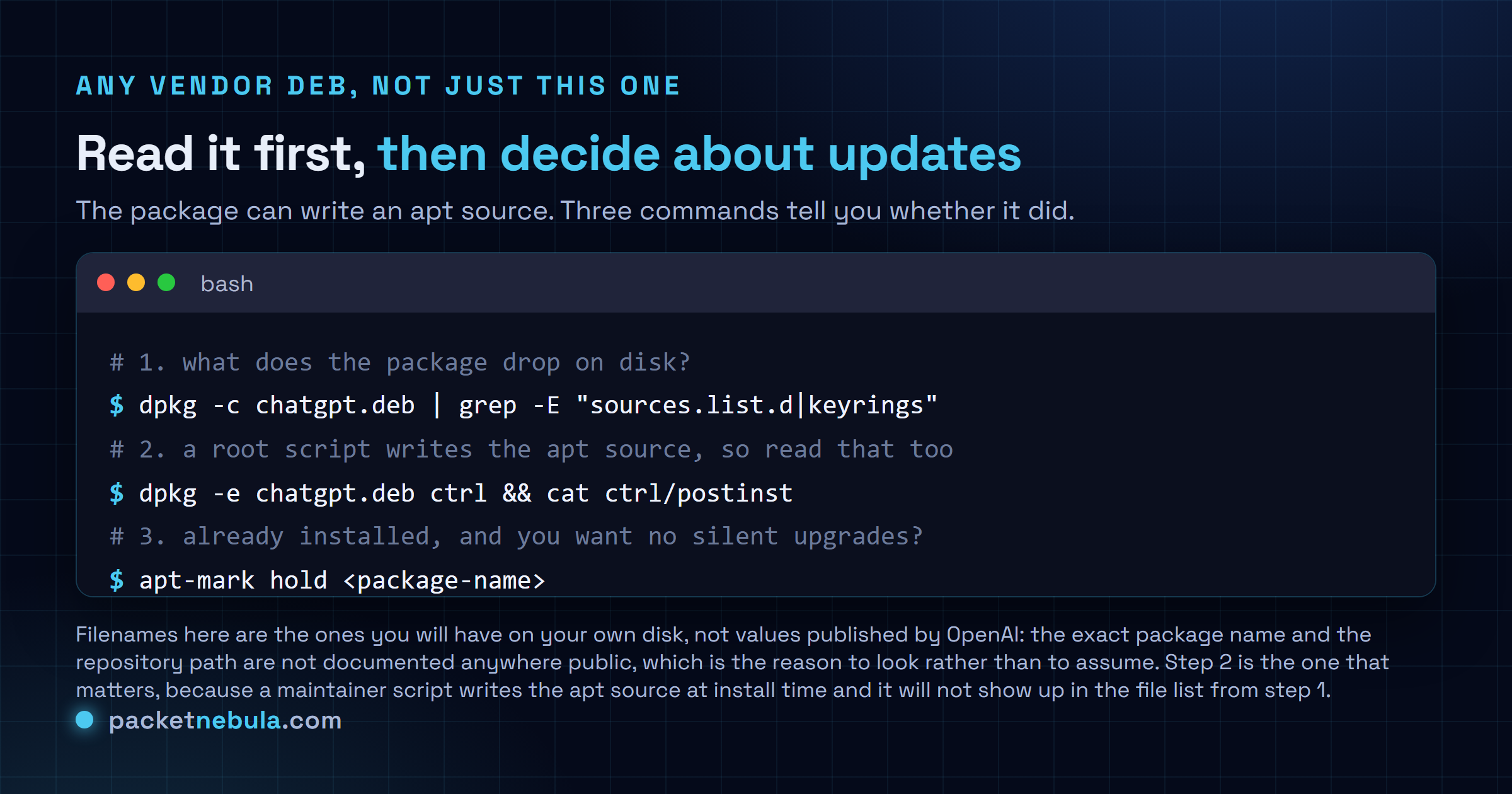
Two commands answer the question. dpkg -c lists what the package puts on disk, so grep that for sources.list.d and keyrings. But an apt source is more often written by a maintainer script than shipped as a file, so extract the control archive with dpkg -e and read the postinst. That script runs as root at install time. It’s the honest answer to what a package is about to do to your system, and reading it takes about ninety seconds.
If it’s already installed and you’d rather freeze it, apt-mark hold on the package name does that, and deleting the file it left in /etc/apt/sources.list.d takes the repository back out. Neither is documented by OpenAI. Both work, because apt is yours.
Codex is the half with a shell
The chat window is a chat window. Codex is not.
It opens local projects, edits files in place, works with git repositories, runs commands, and reads local files without uploading them. That last bit is genuinely good, and it’s the reason a desktop client beats a browser tab for this kind of work. It’s also the reason the update channel matters more here than it would for, say, a Slack client.
What’s missing is any published boundary. No sandbox description. Nothing on what Codex won’t touch, whether it respects a project scope, or how you’d narrow it if you wanted to. We’re not claiming there’s no boundary. We’re saying nobody has written it down, and on a machine holding customer data or production credentials, “presumably it’s fine” isn’t a control. Worth reading up on Linux file permissions before you point an agent at a home directory, if that’s not already muscle memory.
The wider pattern here is agents getting more autonomy by default across every vendor, which we looked at when Claude Code made auto mode the default. Same direction of travel. The tooling to constrain it is arriving slower than the autonomy is.
The distro list is a test matrix
Five entries: Ubuntu 24.04 LTS, Ubuntu 26.04 LTS, Debian 13, Fedora 43, Fedora 44. OpenAI notes that downstream flavours built on those bases should be fine, which covers Mint, Pop, and most of what people actually run.
Read the verb, though. Tested, not supported. There’s no published support statement, no stated minimum, nothing about Wayland versus X11, and no word on what the app is built with. Arch users have AUR packages that are community work, unofficial, and not OpenAI’s problem if they break.

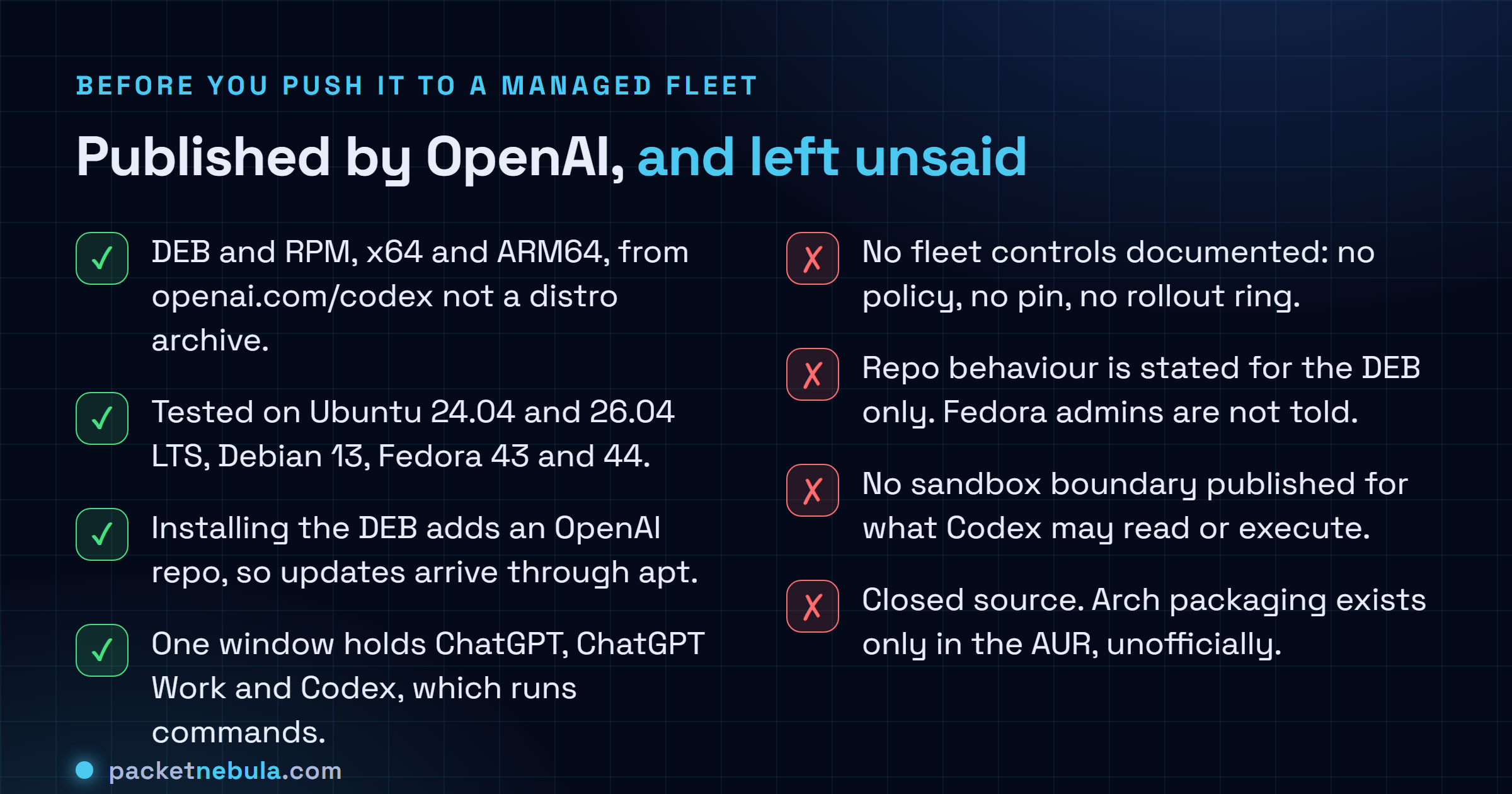
The gap that stands out is fleet management. No policy mechanism, no documented way to pin a version, no staged rollout, no way to take the app without the repository. For one developer that’s noise. For anyone running a managed Linux estate it’s the whole conversation, and its absence tells you who this preview was built for.
Should you install it
If it’s your own machine and you already use ChatGPT: yes, obviously. It’s free to try, the local file access is a real improvement over pasting code into a browser, and a preview breaking on your laptop costs you a restart.
If you’re deciding for other people, we’d hold. Not because anything here looks careless, but because the three things you’d need are all missing at once: a support statement, a version pin, and a written boundary for what the agent may touch. Any one of those absent would be normal for a preview. All three, on a package that adds its own auto-updating repository, is a combination worth waiting out for a release or two.
I might be wrong about the urgency. If your developers are already running Codex through the CLI, the desktop app doesn’t widen the blast radius much, and you’ve made this decision already without calling it one.
Sources
Announcement and package details from TechCrunch, with the distribution list and architecture support confirmed by Phoronix and Linuxiac. The apt repository behaviour and the hands-on details of the app window come from OMG! Ubuntu. Downloads are at openai.com/codex.
Frequently asked questions
Which Linux distributions does the ChatGPT desktop app support?
OpenAI tested it on Ubuntu 24.04 LTS, Ubuntu 26.04 LTS, Debian 13, and Fedora 43 and 44, and says downstream flavours built on those bases should work too. Packages come as DEB and RPM, for x64 and ARM64. Arch isn't on the list: what exists there is community packaging in the AUR, which nobody at OpenAI maintains or vouches for. Note the word tested. It's narrower than supported, and OpenAI hasn't published a support boundary at all.
Does installing the .deb change my apt sources?
Yes. OpenAI states that installing the DEB adds an OpenAI repository to your system, so future updates install through apt alongside your other software. That's convenient on a laptop and a decision on a fleet, because it's a standing trust grant rather than a one-off install. The equivalent behaviour for the RPM isn't described anywhere public, so Fedora administrators are working blind on that point.
What can Codex actually touch on my machine?
It opens local projects, edits files, works with git repositories and runs commands, and it reads local files without uploading them. What isn't published is the boundary: no sandbox description, no documented allowlist, nothing on what it refuses. If you keep customer data or production credentials on the same machine, that gap is the thing to think about before you install, not after.
Can I stop it updating itself?
Nothing OpenAI publishes offers a switch, but apt has one: apt-mark hold on the package name freezes the installed version, and removing the file the package dropped in /etc/apt/sources.list.d takes the repository back out. Both are your tools, not OpenAI's, so you own the consequence of a version going stale during a preview.
Is it worth installing while it is still a preview?
On a personal machine, sure, it costs you nothing but disk. On anything managed, we'd wait. Public preview means bugs and integrations that don't always work, the app is closed source, and there's no policy, no version pin and no staged rollout ring documented for administrators. That combination is fine for one developer and awkward for two hundred.