
Four dollars. That is what forty seconds of Gemini Omni 1.1 Flash costs at 720p list price, and for what Google shipped on 27 August that is fair. Then you read the docs. The forty seconds is four ten second generations chained end to end, and the 4K in every headline is an upscale sitting on top of a 720p render. Neither of those is a scandal, and we would still reach for this model. They just change how you budget a job and what you are safe promising a client. The genuinely new number is $0.03 a second at 360p, a draft tier the old Omni Flash never had, and that is the part we would wire in first.
The short answer
Live since 27 August on the Gemini API and AI Studio as gemini-omni-1.1-flash. Scene extension to a cumulative forty seconds, first and last frame control, video as reference input, and a 360p draft mode that costs a third of 720p. The forty seconds is stitched from four takes and the 4K is an upscale, both of which Google documents and neither of which the headlines mention.
What actually shipped
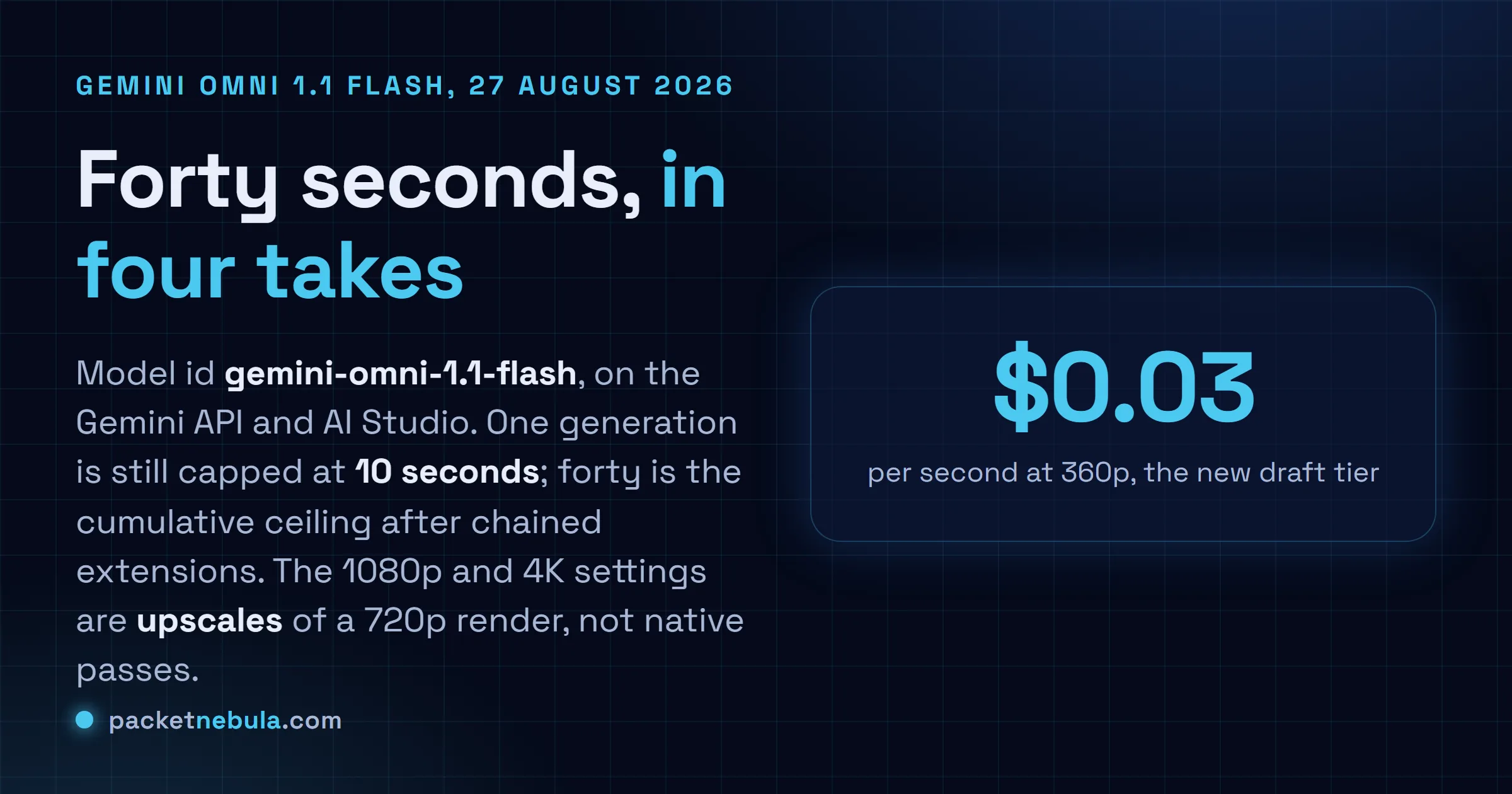
Model id gemini-omni-1.1-flash, on the Gemini API through AI Studio and on the Gemini Enterprise Agent Platform. Google Flow and the Gemini app get the scene extension for Plus, Pro and Ultra subscribers.
Four capabilities are new against the Omni Flash that launched on 30 June.
Scene extension is the headline. The model reads up to ten seconds of the clip you hand it and generates a continuation of three to ten seconds that keeps the character, the lighting and the shot logic. Repeat until you hit the forty second cap. Before this, ten seconds was the end of the road.
Then keyframes. Give it a first image and a last image plus a prompt describing the transformation, and it animates between them. This is the feature that turns prompt roulette into something closer to direction, because you are specifying the two moments that matter and letting the model handle the travel.
Video as reference input arrived too: up to three clips of three seconds each, used as style material inside a prompt. And the 360p draft tier, which Google says renders up to 60 percent faster at a third of the cost.
Adobe Firefly, Figma Weave and Runway are named as integrations in the announcement. Take vendor quotes for what they are.
The forty seconds is four takes
Here is the bit worth reading twice.
A single generation still produces ten seconds. Forty is what you get after chaining extensions, and the docs are explicit that extension appends to the tail of a clip. You cannot prepend. You cannot open a gap in the middle and have the model fill it.
That matters for two practical reasons. Billing first: four segments are four billed generations, so forty seconds at 720p is $4.00 and not some bundled rate. Second, drift. Each extension is conditioned on the previous ten seconds rather than on your original brief, and Google model card admits character consistency and text rendering are still open problems. Four hops from the opening frame, faces wander. We would not build a forty second hero spot this way without budgeting for retakes.
The 4K claim has the same shape. Native render is 720p. The 1080p and 4K settings are an upscale applied afterwards, which the API documentation says plainly even though the coverage did not. Perfectly usable for delivery. Just do not write natively generated 4K into a statement of work.
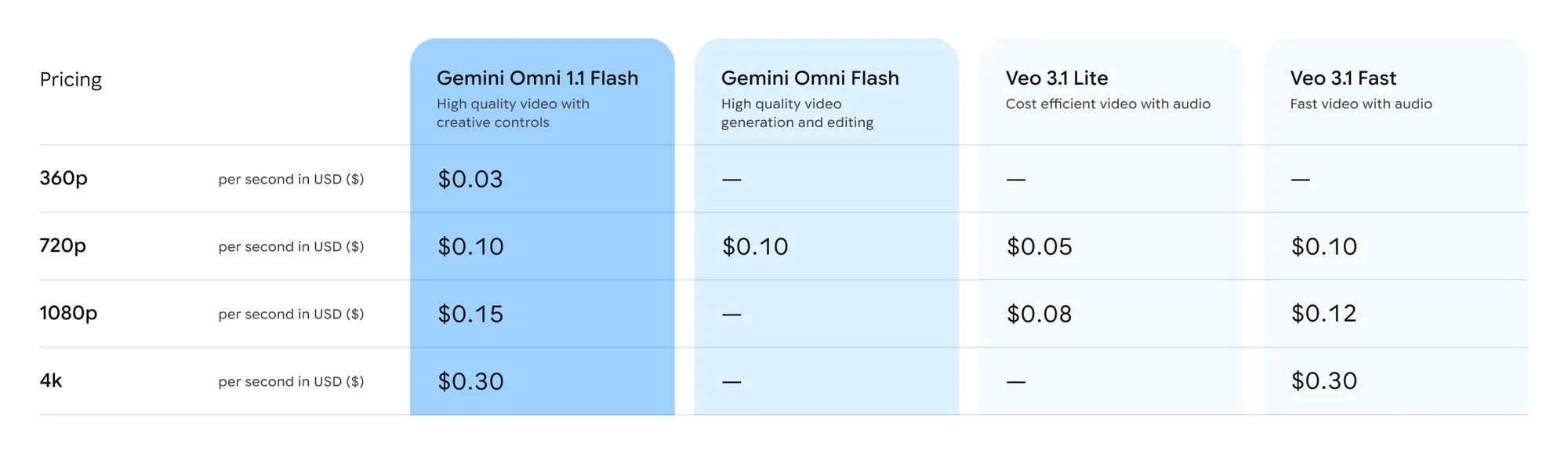
Image: Google, pricing table published with the Gemini Omni 1.1 Flash announcement, 27 August 2026.
Read Google own price table again
Look at the column next to the new model. Veo 3.1 Lite sits at $0.05 a second at 720p, half of what Omni 1.1 Flash charges, and $0.08 at 1080p against $0.15. Google published that comparison itself, which we respect, and it says the new model is not the cheap option in its own lineup.
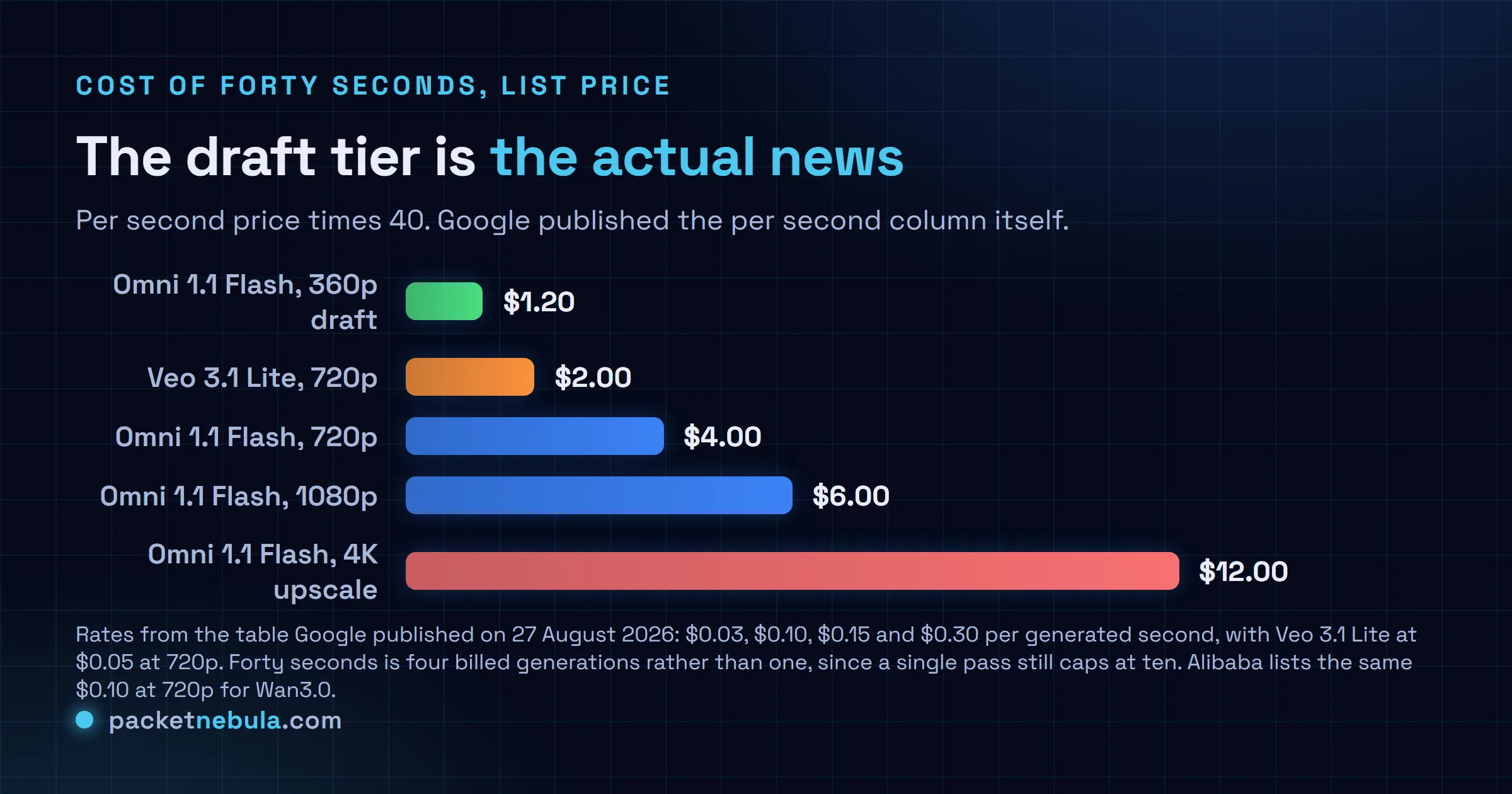
So the draft tier is the real story. Three cents a second means a forty second exploration costs $1.20 instead of $4.00, and 60 percent faster feedback compounds across a session of iteration. Storyboard at 360p, lock the shot, render the keeper once at 1080p. That loop is what we would actually build, and it is the first time the pricing has made it obvious.
For context on the rest of the market, Alibaba lists the same $0.10 at 720p and $0.20 at 1080p for Wan3.0, which does thirty seconds in a single pass with audio and no weights. One pass against four chained calls is a genuine architectural difference, not marketing.
What it will not do
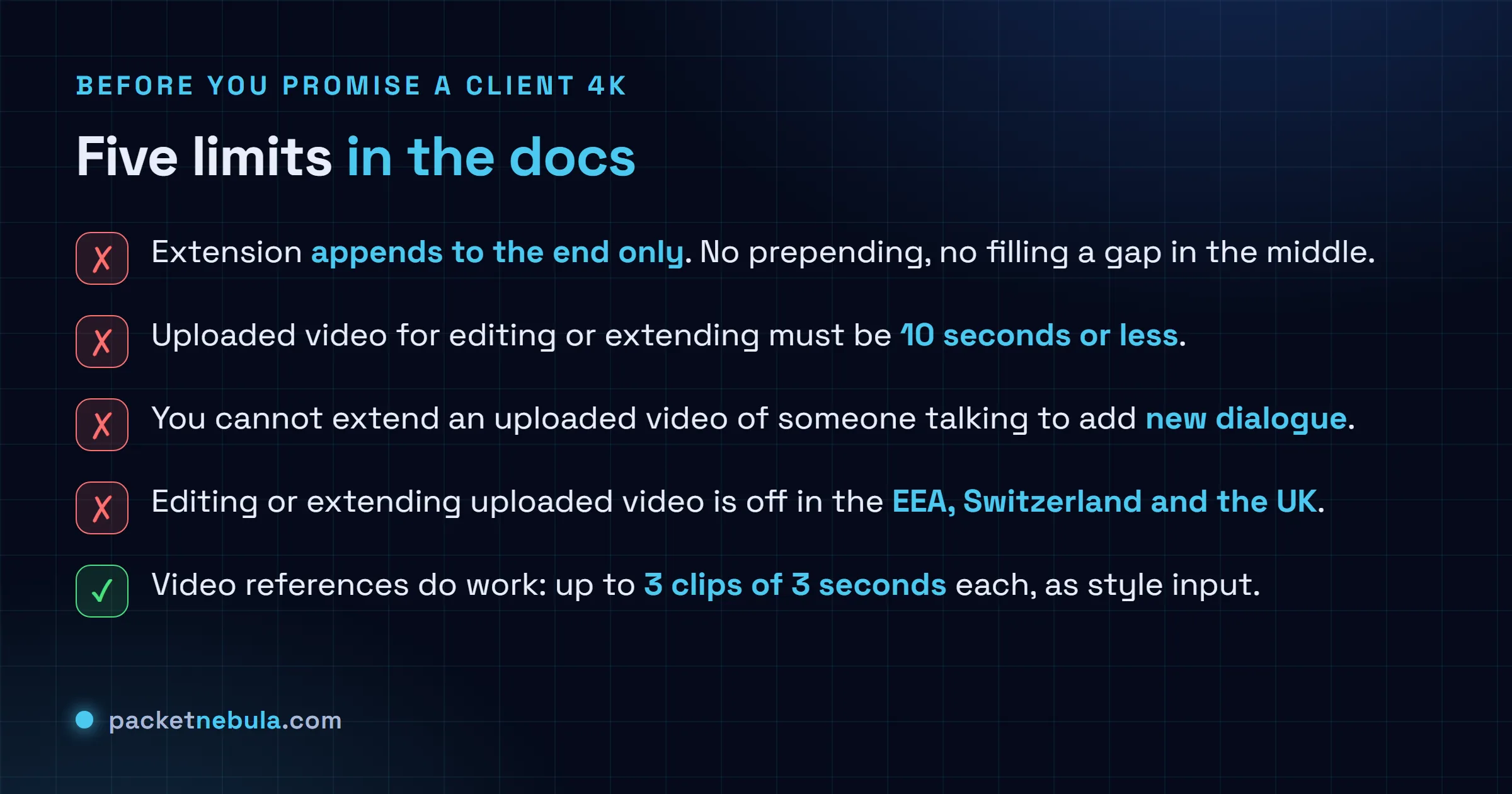
The regional one deserves flagging on its own. If your users are in the EEA, Switzerland or the UK, they cannot edit or extend video they uploaded. Extending model generated video still works, so the workaround is to keep everything inside the model rather than round tripping through an editor. Anyone building a European product around upload and extend needs to know that before the sprint, not during it.
The talking head restriction is the other sharp edge. You cannot take an uploaded clip of a person speaking and extend it with new dialogue. Characters can stay silent, or you extend content the model made. Which quietly rules out the obvious use case of patching a presenter video.
Would we use it
For iteration, yes, and mostly because of the 360p tier. Cheap drafts change behaviour in a way a feature list does not.
For a finished forty second piece, we would price the retakes in and check the last ten seconds hard. Same instinct we had reading the benchmark Google cited for Gemini 3.5 Transcribe last week: the announcement is accurate, the docs are more interesting, and the gap between them is where the planning happens.
I might be underselling the keyframe control. It is the feature with the least measurement around it and possibly the most value, and we have not run it on anything real yet.
Sources
Feature set, availability, the 60 percent draft speed claim and the pricing table: Gemini Omni 1.1 Flash lets you build with more control on the Google blog, 27 August 2026. Model id, task parameters, the upscale wording, the ten second upload ceiling, the dialogue rule and the EEA, Switzerland and UK restriction come from the Generate and edit videos with Gemini Omni Flash documentation, read on 28 August 2026. Token rate and the video output price were read from the Gemini Developer API pricing page the same day. The 30 June launch date for the previous Omni Flash and the model card note on character consistency come from Implicator, and the per resolution rates were cross checked against The Decoder.
Frequently asked questions
How long a video can Gemini Omni 1.1 Flash generate?
Ten seconds per generation, same as before. Forty seconds is the cumulative ceiling you reach by extending a clip in increments, each extension appending three to ten seconds to the tail while the model reads the last ten seconds as context. So a forty second result is four API calls and four billed segments, not one long render.
How much does Gemini Omni 1.1 Flash cost?
Google prices it per generated second: $0.03 at 360p, $0.10 at 720p, $0.15 at 1080p and $0.30 at 4K. Billing is by output token underneath, at $17.50 per million video output tokens and 5,792 tokens per second of 720p video, which lands at about $0.1014 a second before Google rounds it. A full forty seconds costs $1.20 as a 360p draft and $12.00 at 4K. Video output is not on the free tier.
Is the 4K output native?
No. The model renders at 720p by default and 1080p or 4K come out of an upscale pass applied after generation. That is fine for delivery and it is not what native 4K generation means, so if a brief specifies natively rendered 4K this does not meet it. Google own documentation labels the higher resolutions as upscaled output.
Can I extend a video I uploaded myself?
Usually, with conditions. The upload has to be ten seconds or less, extension only appends to the end of a clip, and you cannot extend an uploaded video of somebody talking in order to add new dialogue. Editing or extending uploaded video is also switched off for users in the European Economic Area, Switzerland and the United Kingdom. Extending video the model generated itself works everywhere.
Is Omni 1.1 Flash cheaper than the alternatives?
Not at 720p. Google own comparison table puts Veo 3.1 Lite at $0.05 a second there, half the Omni rate, and Veo 3.1 Fast at the same $0.10. Alibaba Wan3.0 also lists $0.10 at 720p and $0.20 at 1080p, so a thirty second 1080p clip runs about $6 on either. What Omni 1.1 Flash gives you for the premium is the creative control, the keyframes and the 360p draft loop, not a lower unit price.


