
You run the same fiddly export every Monday, and you've explained it to your AI five times already. On July 21 Anthropic shipped a fix aimed straight at that. It's called Record a skill, it sits in the + menu of Claude Cowork inside the desktop app, and it lets you screen-record yourself doing a task once, talk through it as you go, and hand Claude a reusable skill it can replay next week. No instruction file. No metadata to fill in. You just do the thing while it watches. It's live on Pro, Max and Team. There's a catch we'll get to, though, because the recording grabs everything on your screen, logins and all.
The short answer
Anthropic added Record a skill to Claude Cowork, the workspace in the Claude desktop app. You screen-record a task once, narrate your reasoning, and Claude turns the recording into a reusable skill it can replay. No instruction file to write. It’s on Pro, Max and Team. The thing to watch: the session captures your whole screen, so record clean.
What Anthropic actually shipped
Claude Cowork is the workspace part of the Claude desktop app, the place where Claude does multi-step work on your machine instead of just chatting back. Record a skill is a new button in its + menu. That’s the whole entry point.
Here’s the loop. You hit record, you go do the task you keep repeating, and you say out loud what you’re doing and why. Stop the recording, and Claude studies it and writes itself a skill from what it saw. Next time that task lands, the skill runs instead of you walking Claude through every click again.
The framing Anthropic is going for is teach by demonstration. Skills up to now have been more of a builder’s thing: you’d write instructions, set up folders, think about metadata. Record a skill throws that out for the common case. You don’t describe the workflow. You perform it. For a chunk of people who’d never sit down and author an instruction file, that’s the difference between using this and not.
How it actually works
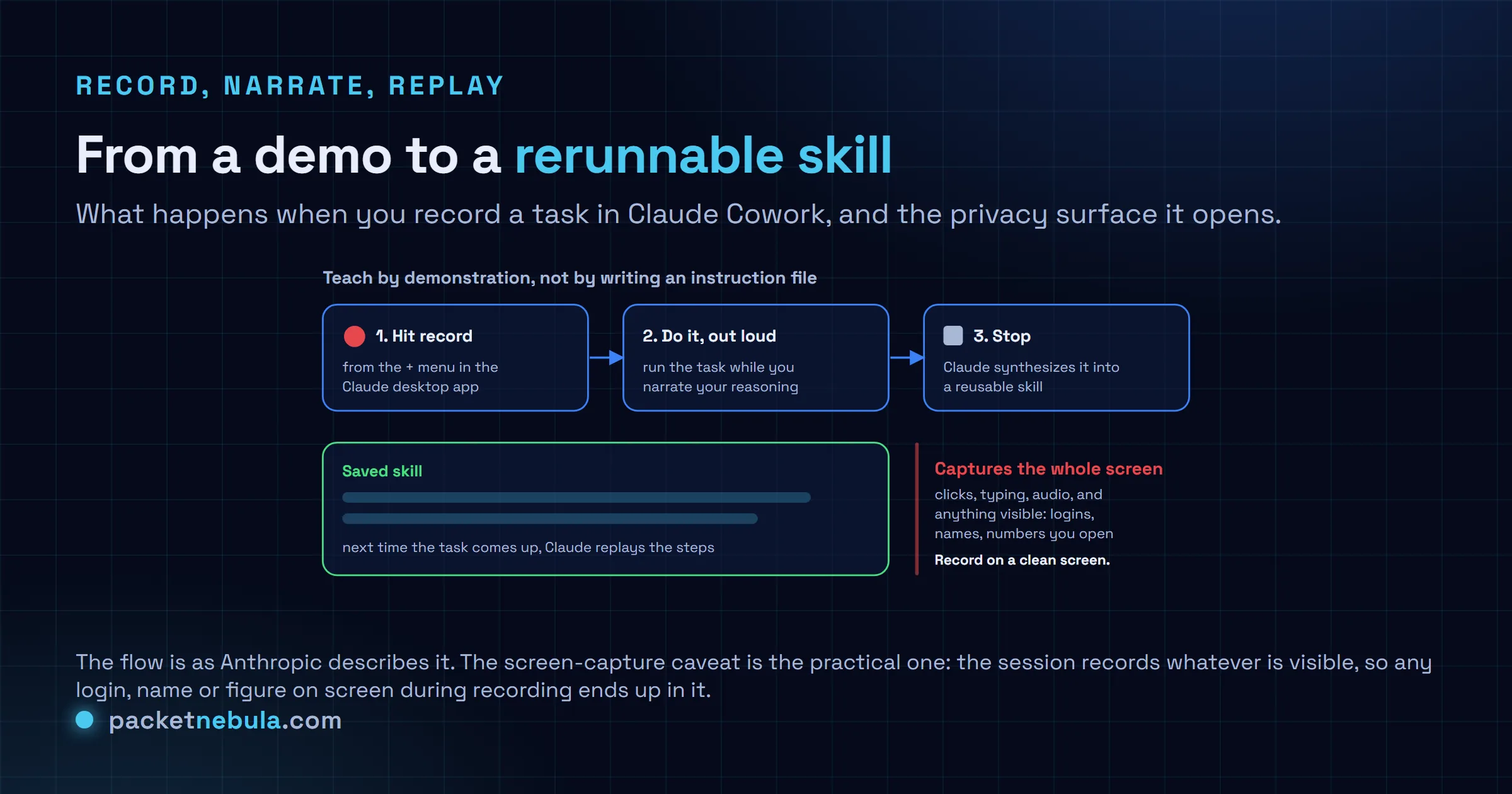
The recording isn’t just video. The session takes in your screen activity, your clicks, your typing, and the audio of you narrating. That’s what lets Claude reconstruct not just the steps but the reasoning behind them, at least in theory. Narrating is doing real work here. If you record yourself renaming files in dead silence, Claude has to guess your logic. Talk through the why, and the skill it writes has a better shot at matching what you meant on a day the files look a little different.
Good candidates are the boring recurring stuff. A weekly report you assemble the same way. A batch of files you sort into the same folders every month. The kind of task that’s too small to script properly but annoying enough that you’ve done it forty times.
The catch nobody’s putting in the headline
This is the part we’d lead with. The recording captures whatever is on your screen. All of it.
Log into a service while the recording runs, and that credential is in the session. Leave a client’s name, a home address, a bank figure sitting in another window, and it’s captured too. Nobody’s accusing Anthropic of anything shady here. It’s just the nature of recording a screen: the camera doesn’t know which pixels are private. So the discipline is on you.
Before you hit record, clear the deck. Close your email, your password manager, any tab with someone’s data in it. Have only the app you’re demonstrating open. Treat it like screen-sharing on a call with a stranger, because that’s the same exposure. Do that and the feature’s genuinely handy. Skip it and you’ve handed a reusable artifact a copy of whatever you forgot to close.
Who it’s for, and what we’d actually expect
The honest read: this is aimed at the non-technical expert. The accountant, the ops person, the marketer who knows their workflow cold but was never going to hand-write an instruction file for an agent. For them, recording a task once is a real unlock, and it fits how the Claude tooling has been getting more approachable lately.
Does a one-take recording replay cleanly on a messier day, when a button moved or the data’s shaped a bit differently? That’s the open question, and it’s the one we can’t answer from a launch post. Demos always run on tidy screens. Real Mondays don’t. Our bet is these early skills are best treated as drafts you watch the first few times, not fire-and-forget automations you trust blind.
There’s a comparison floating around to OpenAI’s Codex, which does its own record-and-replay of workflows. Fair enough, the idea rhymes. The Cowork version leans at desktop chores rather than code, and it’s landing while Anthropic keeps shuffling what’s in each plan, so which tier you’re on decides whether you see the button at all. Worth ten minutes if you’ve got a task you keep re-explaining. Just clean your screen first.
Sources
The launch, the + menu location and the Pro, Max and Team availability as reported by The Decoder and summarized in Build Fast with AI. The screen-capture and privacy caveat, plus the teach-by-demonstration framing and the Codex comparison, are drawn from the same reporting. Where a claim rests on a single write-up rather than an Anthropic statement, it’s flagged as such above.
Frequently asked questions
What is Record a Skill in Claude Cowork?
It is a feature Anthropic added to Claude Cowork, the workspace section of the Claude desktop app, around July 21, 2026. You screen-record yourself doing a task and narrate what you are doing out loud. Claude watches the recording, then turns it into a reusable skill it can run again when the same task comes up, without you having to re-explain the steps.
Which plans get Record a Skill?
It is available on Pro, Max and Team plans. You find it under Record a skill in the + menu of the Claude desktop app. If you only use Claude in a browser or on a plan below Pro, you will not see the option yet.
Is Record a Skill safe with sensitive data on screen?
That is the part to slow down on. The session captures whatever is visible while you record: clicks, typing, audio, and anything on screen. If you log into a service mid-recording, that credential is in the session. Any name, address or financial figure on screen gets captured too. Record on a clean screen with only the app you are demonstrating, and close anything private first.
Do I need to write prompts or instructions to make a skill?
No, and that is the whole pitch. Instead of writing an instruction file, folders or metadata by hand, you teach by demonstration. You do the task once with narration and Claude synthesizes the skill from that. It is aimed at making agent customization reachable for people who do not want to hand-author instructions.
Is this the same as OpenAI Codex recording workflows?
They rhyme. Some coverage notes OpenAI Codex offers comparable record-and-replay of workflows as reusable steps. The Claude Cowork version is pitched more at non-technical desktop tasks, like recurring reports and file organization, than at code. Either way, treat an auto-generated skill as a first draft you check, not a proven automation.


