

Somebody on the network team pulls a capture off the guest wifi, filters for TLS, and half the hostnames are gone. The Android half. That is Android 17 doing what Google announced on 27 August: Encrypted Client Hello is on by default, so the SNI field that used to spell out the destination in clear text is encrypted now. What most of the coverage skipped is how narrow that is. We went through the developer docs, and the short version is that your DNS query still carries the same hostname unless the device uses private DNS, the destination IP never moved, and ECH only fires when four separate things line up. Miss one and Android still sends an ECH extension. It is just full of random bytes.
The short answer
Android 17 enables Encrypted Client Hello by default for apps that target API 37. It encrypts the SNI in the TLS handshake, so a box on the path stops reading the hostname there. It does not touch your DNS query or your destination IP. And it only encrypts anything when the app, its HTTP library, DNS and the far end server all cooperate. Otherwise Android sends decoy bytes that look identical on the wire.
What the 27 August post actually says
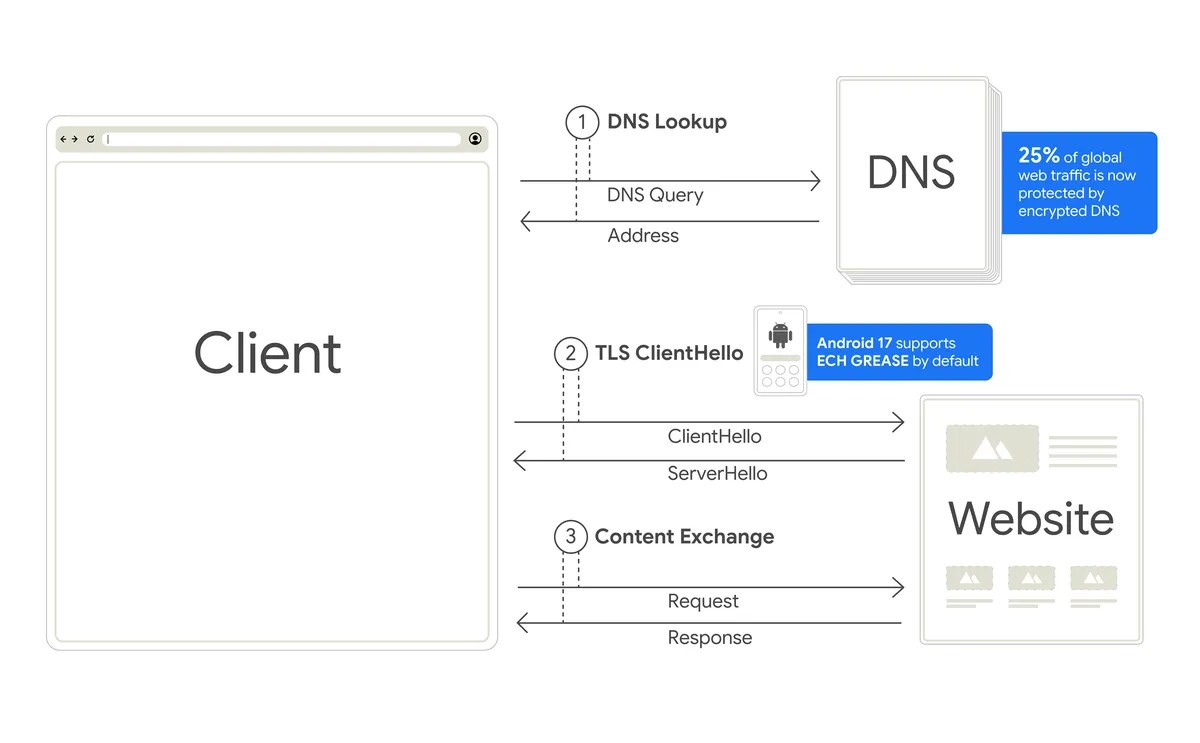
Image: Google
The mechanism first, because it is the part people get backwards. HTTPS has always encrypted the page. The ClientHello that opens the connection has always named the site in clear, because the server needs to know which certificate to hand back. ECH wraps that inner ClientHello in encryption only the destination can open and sends an outer one carrying the provider’s public name instead. Google calls Android 17 the first major mobile OS with broad ECH support and says it works in tandem with private DNS, which is a more honest framing than most of what got written about it.
Read Google’s own diagram above for the giveaway. The 25 percent figure sits on the DNS step, not the TLS step. Encrypted DNS covers a quarter of global web traffic by their count, which means for the other three quarters the hostname is already out loud, one round trip before the handshake ECH just protected.
Three more changes landed in the same post, on the same handsets. Certificate Transparency is now on by default, so a certificate has to be logged in a public registry. Local Network Protection is enforced, meaning an app has to hold permission before it scans for or connects to devices on your LAN. And participating carriers can switch 2G off for their subscribers with nothing required from the user. That LAN one probably deserves its own article, because it quietly changes what a mobile app can discover on a corporate wifi.
What it costs you, if you run the network
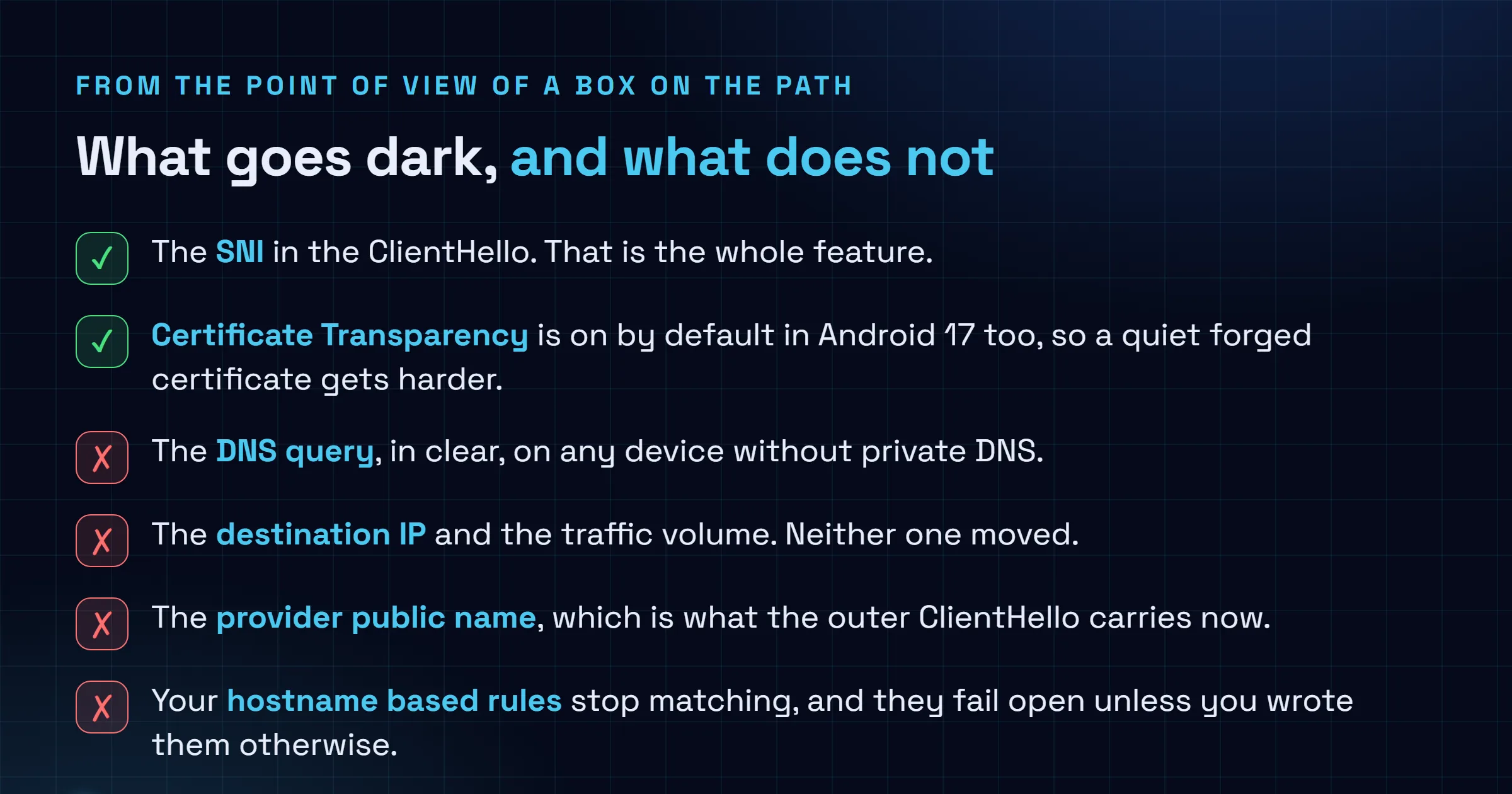
If you filter, log or bill on SNI, those rules stop matching for Android 17 traffic that clears every gate below. That is the whole operational story, and it is enough.
Two consequences worth planning for. Hostname policy needs a second source of truth, and the obvious one is DNS: run the resolver, enforce there, and Android’s own private DNS setting works with you rather than against you. If your policy instead lives in a TLS inspection box keyed on the SNI it reads off the wire, that box now sees a provider’s public name on some connections and a real hostname on others, with no way to tell which is which from the extension alone. Second thing, and the one that will actually bite: go check what your rules do when the hostname is missing rather than wrong. Most fail open. Ours did.
Both readings of this are correct at the same time. It is a genuine privacy win for someone on a hostile network, and a real headache for someone running an honest one. Google picked a side, and I think they picked the right one, though the people who have to rewrite a filtering policy this quarter are allowed to be annoyed about it.
Four gates, then encryption
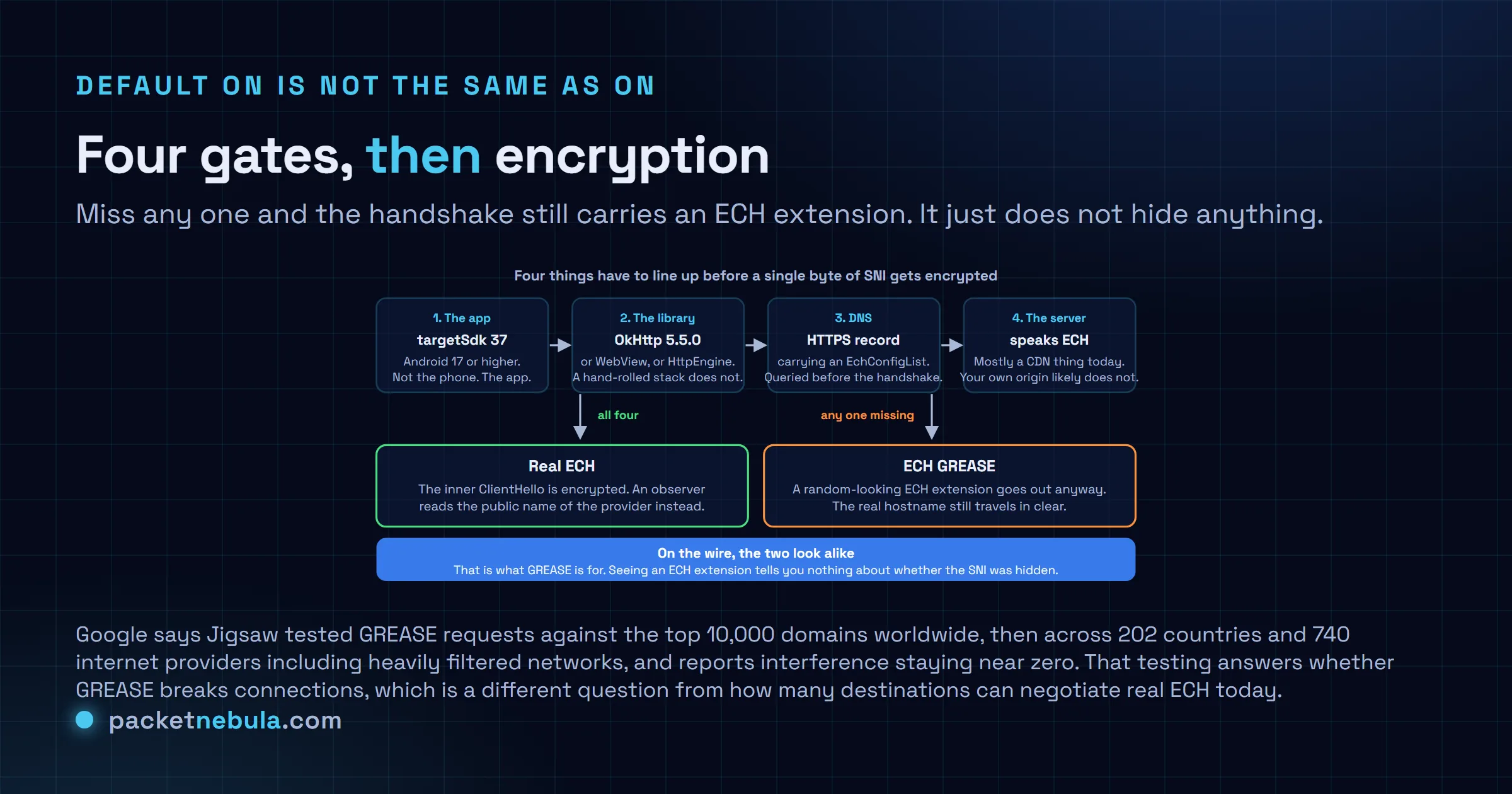
The developer documentation is blunter than the blog post. ECH is used for TLS connections in apps targeting API level 37 or higher, and it is active only if the networking library has integrated ECH support and the remote server supports the protocol. So an app compiled against API 35 on a brand new Pixel keeps doing exactly what it did last month.
The config itself comes out of DNS. The client queries an HTTPS resource record for the hostname, pulls an EchConfigList out of it, and feeds that to the handshake. No record, no ECH. That dependency is why the private DNS pairing matters twice over: without it, the lookup that fetches the ECH config is itself in clear, naming the site you are about to hide.
When any gate fails, Android sends ECH GREASE, an ECH extension with randomised contents. It is there so middleboxes tolerate the extension instead of dropping it, and so real ECH does not stand out by existing.
If you ship the app rather than the network, the opt-out is per domain, in the Network Security Configuration:
<network-security-config>
 <base-config>
 <domainEncryption mode="enabled"/>
 </base-config>
 <domain-config>
 <domain includeSubdomains="true">disable-ech.example.com</domain>
 <domainEncryption mode="disabled"/>
 </domain-config>
</network-security-config>
Two values, enabled and disabled, set globally in base-config or overridden per domain. Google’s docs are clear that the element only does anything when your networking library has adopted ECH, which is the OkHttp 5.5.0 line again. There is also an EchConfigMismatchException for the case where a server has rotated its config: the retry list arrives in the exception, and you have to verify the public hostname before trusting it.
To see what a given server negotiates today, our SSL checker reports the protocol version and the certificate chain. And ECH is a TLS 1.3 extension, so if the version story underneath it is fuzzy, we wrote up TLS 1.2 versus TLS 1.3 a while back.
Sources
Google, Android 17 introduces 4 new network security features, 27 August 2026 (the announcement and the diagram above). Android Developers, Adopting Encrypted Client Hello and Behavior changes: apps targeting Android 17 or higher (API 37 default, the DNS HTTPS record, GREASE, the exception handling). Android Developers, Network security configuration (the domainEncryption element and the example above). Engadget, Google deploys support for Encrypted Client Hello on Android 17, 27 August 2026. Help Net Security, Android 17 adds new protections against sneaky Wi-Fi tracking and web snooping, 28 August 2026 (the Jigsaw testing figures).
Update, 7 October 2026. Today only OkHttp 5.5.0 with explicit DNS configuration does Encrypted Client Hello. HttpEngine waits for Android 17 QPR2, and WebView has no date.
Frequently asked questions
Does Encrypted Client Hello hide my browsing from my ISP?
Partly, and only if several things hold at once. ECH encrypts the Server Name Indication inside the TLS handshake, so the hostname stops appearing there. It does nothing about the DNS query that came first, which still names the destination in clear unless the device is set up for private DNS, and it does nothing about the destination IP address or the amount of data you move. Google frames ECH as working in tandem with private DNS for exactly that reason.
Is ECH on for every app on an Android 17 phone?
No. It is enabled by default for apps that target Android 17, API level 37, and only when the networking library the app uses has integrated ECH support. Google names HttpEngine, WebView and OkHttp, and tells developers to upgrade to OkHttp 5.5.0. An app still targeting an older API level, or one that opens its own sockets with a hand-rolled HTTP stack, behaves the way it did before.
What is ECH GREASE and why does it matter to me?
When ECH cannot be negotiated, Android sends an ECH extension filled with randomised contents instead of leaving it out. The point is that middleboxes get used to seeing the extension, and that using real ECH does not become a distinguishing signal on its own. The practical consequence for anyone reading a capture: the presence of an ECH extension tells you nothing about whether the hostname was actually hidden. Google says Jigsaw tested GREASE against the top 10,000 domains, then across 202 countries and 740 internet providers, and reports interference staying near zero.
How do I turn ECH off for one domain in my Android app?
Android 17 adds a domainEncryption element to the Network Security Configuration file. It takes a mode attribute with the values enabled or disabled, and you can put it in base-config to set the global behaviour or in a domain-config block to override one domain. The element only has an effect if the app's networking library supports ECH in the first place.
What else shipped in the same Android 17 announcement?
Three other network changes. Certificate Transparency is enabled by default, so certificates have to be logged in a public registry. Local Network Protection is enforced, so an app has to hold permission before it scans for or connects to devices on the local network. And participating mobile operators can now switch 2G off for their subscribers with no action needed from the user.


