




The headlines made it sound like every Linux PC turns into a brick on 27 June 2026, the day Microsoft's 2011 Secure Boot certificate expires. It doesn't. If your machine boots today, it keeps booting after that date, dual-boot and all, because expiry stops Microsoft signing new boot components, it does not revoke the keys your firmware already trusts. So nothing detonates in June. The real problem is slower and quieter: new distro installs and future shim and kernel updates are signed with Microsoft's 2023 certificate, and your firmware will not trust those until you enroll the new key. On Linux that is one command through fwupd, when your vendor ships it. Here's what is actually expiring, what genuinely breaks, and exactly what to run.
The short answer
Microsoft’s 2011 Secure Boot certificates expire through 2026 (the Linux shim cert on 27 June). Nothing that boots today stops booting: expiry is not revocation. The catch is tomorrow. New installs and future shim updates use Microsoft’s 2023 certificate, so you enroll the new key in your firmware with fwupd. One command, one reboot.
Nothing bricks in June (or October)
Here is the whole panic, defused, in one paragraph. Microsoft’s 2011 Secure Boot certificates expire across 2026, but expiry is not revocation. A certificate that has already vouched for the bootloader sitting in your firmware keeps being trusted; expiry only means Microsoft can no longer sign new things with it. So the machine that boots Linux this morning boots it tomorrow, and the morning after 27 June, dual-boot and all. Anyone telling you to back up and reinstall before the date is selling fear. Fedora’s own write-up is, fittingly, titled “Don’t Panic.”
What is actually expiring
Three certificates, three jobs, three dates.
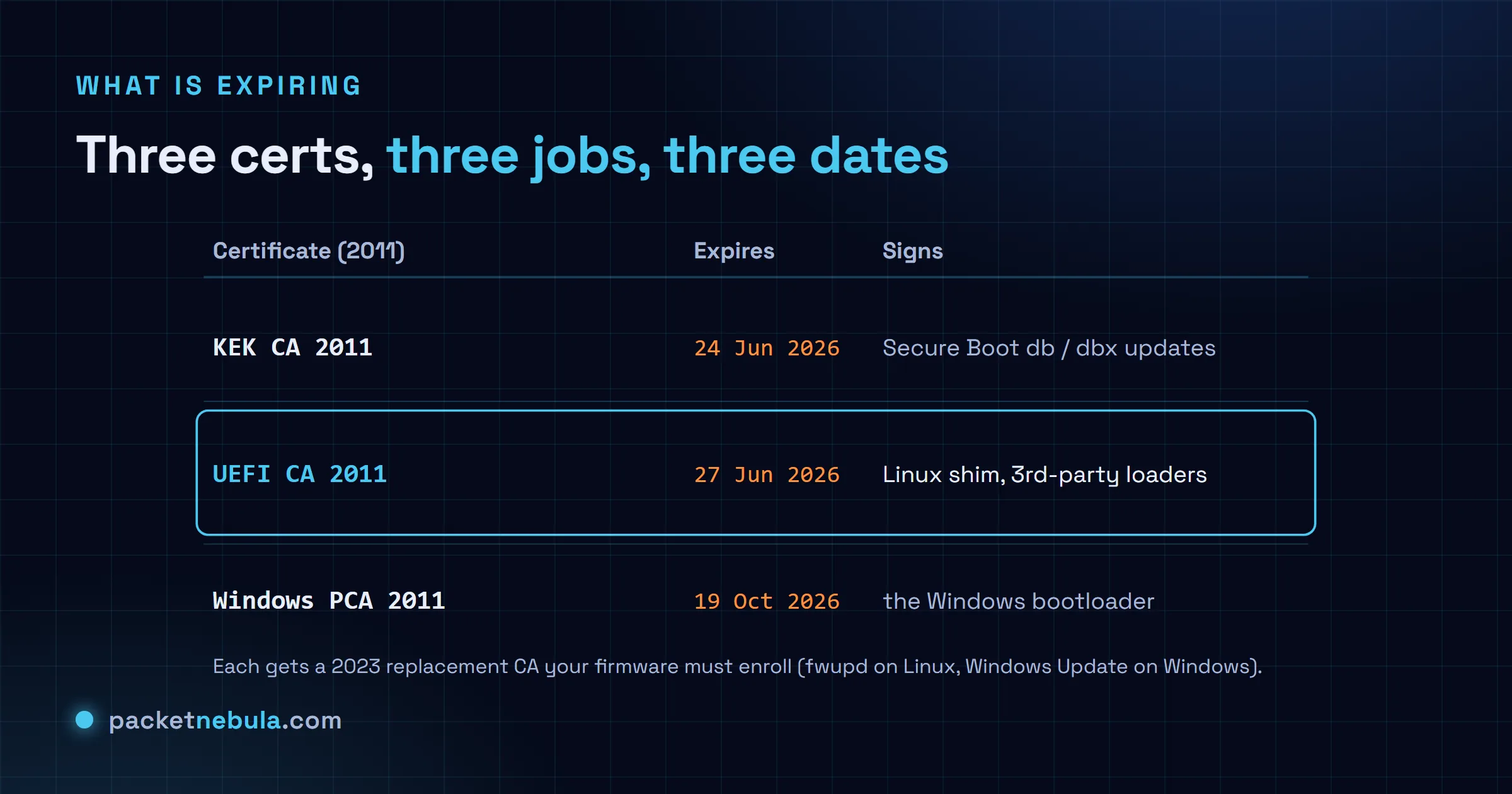
The one Linux cares about is the Microsoft UEFI CA 2011: it signs third-party bootloaders, which in practice means the shim, the small Microsoft-signed first stage that then loads your distro’s GRUB and kernel. It lapses 27 June 2026. Next to it, the KEK CA 2011, which signs updates to the Secure Boot databases themselves, expires 24 June 2026, and the Windows Production PCA 2011, the one behind the Windows boot loader, runs out 19 October 2026. Each has a 2023 replacement that needs to be sitting in your firmware’s key database for the new signatures to be trusted.
The real problem: tomorrow’s updates, not today’s boot
This is the part that genuinely matters. New shims, and the new kernels they load, are now signed with Microsoft’s 2023 certificate. Firmware that only knows the 2011 keys will refuse to run them. So two things quietly stop working if you do nothing:
- New installs. Boot a freshly downloaded distro on an untouched machine and its 2023-signed shim may not be trusted, so the installer never starts while Secure Boot is on.
- Security updates. Once your distro moves to 2023-signed shims, firmware that has not enrolled the 2023 key stops accepting them, so you stop receiving boot-level security fixes. That is the “degraded security” the vendors warn about, and it is the slow-burn risk, not a dramatic June failure.
And dual-boot does not make any of this worse. Windows and Linux lean on the same Secure Boot keys in the same firmware, so the expiry hits the machine evenly or not at all. There is no special Linux curse here, whatever the headline implied.
The fix: enroll the 2023 key with fwupd
On Linux the whole thing is usually two commands, because the firmware key update ships through the Linux Vendor Firmware Service and fwupd applies it. Refresh the metadata first:
sudo fwupdmgr refresh
Then pull and apply whatever your vendor has published:
sudo fwupdmgr update
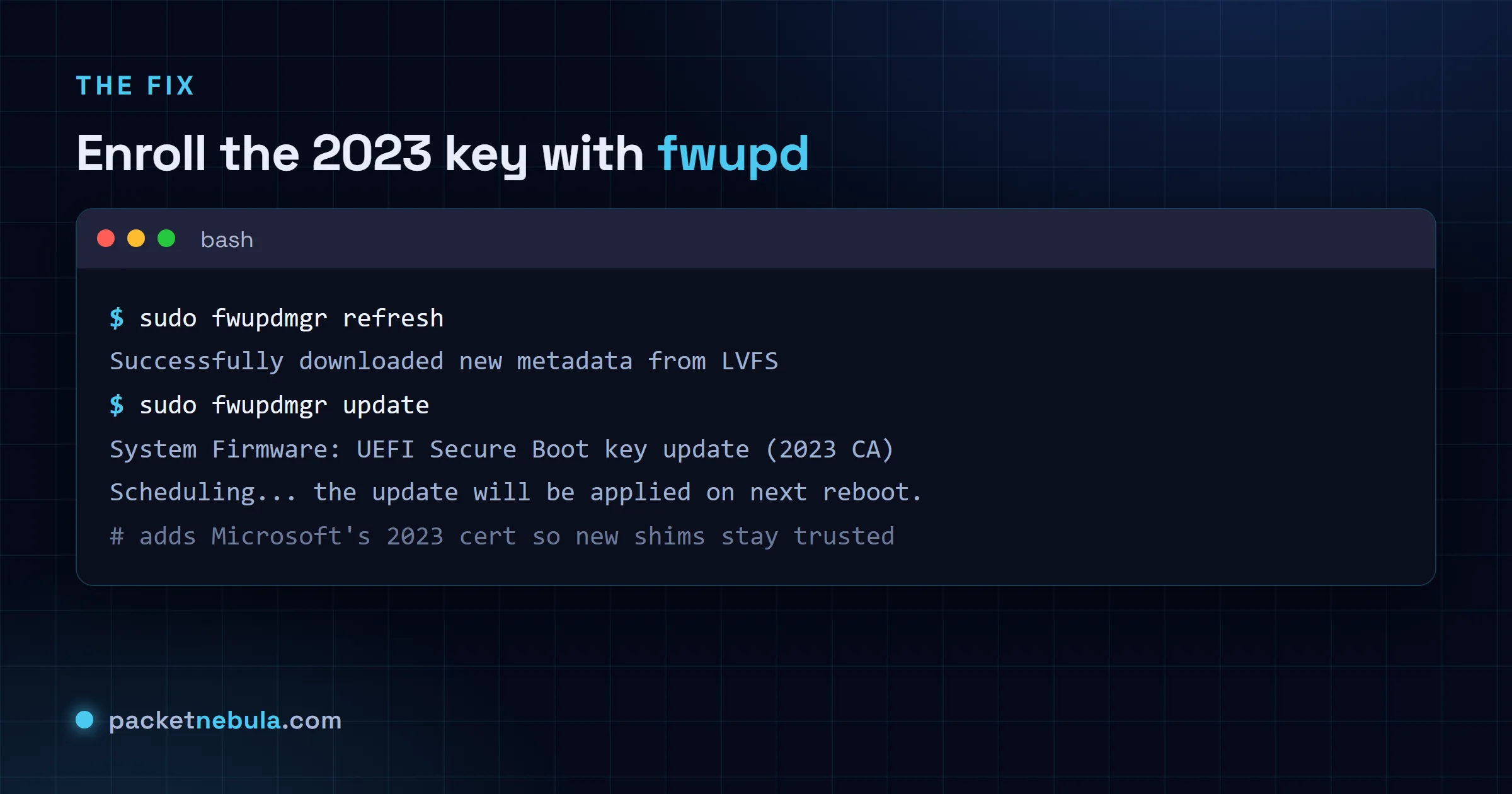
If your vendor has pushed the update to the LVFS, fwupd offers it, schedules it, and applies it on the next reboot, adding the 2023 certificate to your firmware’s db. If fwupdmgr shows nothing for your hardware, the update simply has not been published for your board yet: check again later, or ask the OEM for a UEFI update that does the same job. On a Windows-and-Linux dual-boot machine, letting Windows Update run enrolls the new keys too, because it is the same firmware database underneath. It is the same kind of scheduled housekeeping as renewing a TLS certificate before it lapses: boring, and a non-event if you do it on time.
What not to do
Three tempting “fixes” that make things worse:
- Do not remove the 2011 certificate. It still vouches for legacy option ROMs on graphics and network cards; pull it and those peripherals can stop initialising. Add the 2023 key, do not subtract the old one.
- Do not hand-edit the Secure Boot db with efivar incantations from a forum unless you truly know the consequences. A botched db is a machine that will not boot, which is exactly the disaster the panic warned about, now self-inflicted.
- Do not “solve” it by turning Secure Boot off. It works, and it throws away the boot-level tamper protection you turned it on for.
Run sudo fwupdmgr update sometime in the next few months, reboot, and you are finished: your firmware now trusts both the old and the new Microsoft keys, your current install keeps booting, and the next one will too. The 2026 expiry is a chore with a frightening headline, not an emergency.
Sources: Microsoft Support, Red Hat and Fedora Magazine. Certificate names and dates as published by Microsoft for 2026.
Frequently asked questions
Will my Linux PC stop booting on 27 June 2026?
No. A machine that boots today keeps booting after the date, dual-boot included. Certificate expiry is not revocation: the keys already trusted in your firmware stay trusted, so your installed shim and kernel keep loading. Expiry only stops Microsoft from signing new boot components with the old 2011 certificate.
What actually breaks when the Secure Boot certificate expires?
Two things, both about the future, not today. New OS installs: a freshly downloaded distro signed with the 2023 certificate may not be trusted by firmware that only knows the 2011 keys, so the installer will not start under Secure Boot. And future security updates: once your distro ships 2023-signed shims, firmware without the 2023 key stops accepting them, so you fall behind on boot-level fixes.
How do I update Secure Boot keys on Linux?
Through fwupd, when your hardware vendor has published the update to the Linux Vendor Firmware Service. Run sudo fwupdmgr refresh then sudo fwupdmgr update, and reboot to apply. That enrolls the Microsoft 2023 certificate in your firmware db. If fwupdmgr offers nothing for your board, the update is not published for it yet: check back, or ask your OEM for a UEFI update.
Does this affect Windows and Linux dual-boot?
It affects both equally, which means neither is specially cursed. Windows and Linux rely on the same Secure Boot keys in the same firmware, so the expiry hits the machine, not one OS. On a dual-boot system, letting Windows Update run also enrolls the new keys, since it is the same firmware database that Linux uses.
Should I just disable Secure Boot to avoid the hassle?
You can, and it is a real downgrade. Disabling Secure Boot removes the boot-level tamper protection entirely, which is a much bigger loss than the housekeeping you were avoiding. It is fine as a momentary diagnostic, wrong as a permanent answer. Enroll the 2023 key instead and keep the protection.